
For my project, I have chosen the Ultimate Markdown plugin. I have chosen to use it because of various reasons, like:
- Enterprise adores Markdown: Variety of apps chose Markdown syntax as their main formatting syntax. It is used in apps like Discord, Slack and GitHub.

- It eases your dependency on the mouse: While writing markdown, most of the formatting components are already built-in to the syntax. For example, in normal post creation, you need to grab your mouse, wait for UI to show the Bold button, and click on it. That’s a lot of steps for such a simple task! In Markdown, you just write
**Some Text**and it renders it as Some Text - It’s a cross-platform way of writing things: You don’t need to rewrite your article if you want to post it somewhere else, because the Markdown has a standart, and every implementation should support your text
Installation
The installation process is very simple. Go to the Plugins section and search for Ultimate Markdown. Click Install, Activate and you’re done!
Usage
After activation, your admin panel got an additional button called Markdown
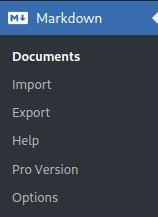
And in the documents submenu you can start writing your Markdown posts.
After you’re done with your post, add/save it. Then, to make wordpress create your post, you should crate one in the Posts menu. After creating a blank post, go to the sidebar with Post settings, click on Load Markdown sybmenu, and choose your document from the dropdown. Then the plugin will do all the styling you told it to do and convert it into WordPress blocks. Now you can do some minor editing, if you want to. That’s it, now your Post is ready to be saved and shown to your public.
Leave a Reply